
Engineering capacity planning is the process of matching your team’s actual available hours and skills to upcoming work, so commitments reflect reality instead of hope. The sections below walk through the SPACE framework, sprint-start checks, and a repeatable step-by-step process you can put to use this week.
TL;DR:
- Planning to around 75 to 80% of available hours with a buffer improves sprint completion and reduces burnout compared to planning for 100%.
- A three-step process of forecasting demand, mapping skills, and adjusting for true available hours ensures capacity matches realistic workload limits.
- Tracking metrics like committed hours versus available hours, cycle time, and unplanned work, along with qualitative signals, helps detect capacity issues early.
- Running quick capacity checks at each sprint start, monthly reviews, and quarterly strategic assessments keeps planning accurate and aligned with team needs.
- Using staff augmentation is recommended for short-term gaps, while hiring should target persistent capacity issues, with careful vendor evaluation and cost analysis.
Table of Contents
- What engineering capacity planning actually means
- Why disciplined capacity planning pays off
- Choosing the right planning horizon
- Lead, lag, and match: capacity strategies and their tradeoffs
- A five-step process for planning capacity
- Metrics and signals worth tracking
- Dashboards and templates without the tooling overhead
- A lightweight checklist and meeting cadence
- How outside engineering capacity fits into the plan
- Lessons learned and common pitfalls
- Closing short-term gaps with senior engineering support
- Sources
- FAQ
What engineering capacity planning actually means
Engineering capacity planning matches real demand against the actual hours and skills your engineers have free, not against headcount on an org chart. The goal is simple to state and hard to execute: know how many productive hours exist in a given period, by skill, and commit only what fits.
This differs from resource planning, a broader discipline that also covers equipment, licenses, budgets, and cross-functional allocations across an organization. Capacity planning is narrower and more operational: it lives inside engineering and focuses on people-hours and skill fit.
Three misconceptions cause most of the damage:
- Planning to headcount instead of availability, which ignores PTO, on-call rotations, and part-time contributors.
- Assuming a full 40-hour week per engineer, when meetings and overhead routinely eat into that total.
- Ignoring the overhead of context switching, code review, and support tickets when estimating what a sprint can absorb.
Getting this distinction right changes which metrics you trust and which conversations you have with stakeholders.
Why disciplined capacity planning pays off
Teams that plan capacity deliberately make commitments that hold up, which keeps trust intact with product and leadership. The payoff shows up in several concrete ways:
- Delivery dates become credible because they are built from real hours, not optimism.
- Engineers get more protected deep-work time, which tends to reduce burnout over a quarter.
- Prioritization gets faster because the team already knows what fits before a debate starts.
- Hiring and augmentation decisions get easier to justify because they are backed by a documented gap, not a feeling.
None of this requires heavy tooling. It requires an honest accounting of hours and a habit of checking that accounting before every sprint.
Choosing the right planning horizon
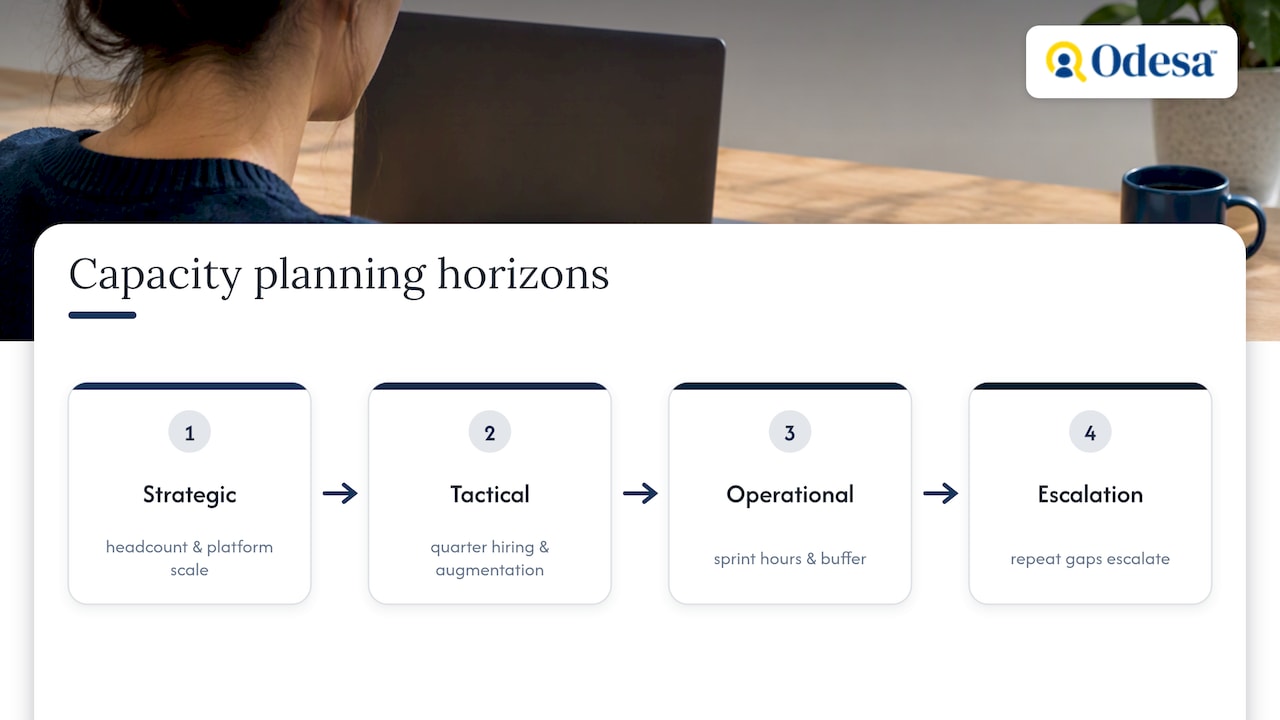
Capacity planning operates at three horizons, and conflating them is a common source of friction. Strategic planning looks out multiple quarters and concerns headcount growth, platform scale, and whether the org chart matches the roadmap’s ambition.
Tactical planning works at the quarter level: translating the roadmap into team-by-team commitments, shaping the hiring pipeline, and deciding whether contractors or augmented engineers fill near-term gaps. This is where most augmentation decisions get made, since a quarter is often too short to hire but too long to ignore a gap.
Operational planning is the sprint-level work: available hours, buffer, and what gets committed this cycle. It is the layer managers touch most often and the one most teams under-invest in, despite it being the cheapest to maintain.
When operational signals repeat for two or three sprints in a row, such as the same skill gap blocking work each cycle, that is the trigger to escalate to the tactical layer and consider hiring or augmentation rather than absorbing the strain indefinitely.
Lead, lag, and match: capacity strategies and their tradeoffs
Three broad strategies govern how teams build capacity ahead of or behind demand, and each carries a different risk profile.
A lead strategy hires ahead of anticipated demand. It reduces delivery risk because capacity exists before the workload arrives, but it carries financial risk: if the roadmap shifts or revenue lags, you are paying for capacity that sits idle.
A lag strategy hires after demand has already materialized. It is financially conservative since spend follows proven need, but it means the team absorbs a period of overload before relief arrives, often the stretch where burnout and quality slip.
A match (or just-in-time) strategy uses staff augmentation and cross-training to flex capacity up or down close to real time. It avoids both the idle-cost problem of leading and the overload problem of lagging, at the cost of needing a reliable channel to bring in skilled engineers quickly. Cross-training holds up better when each handover follows a written knowledge transfer plan.
Buffer policy interacts with all three. A team that consistently plans to 75 to 80 percent of available hours has more room to absorb a lag-strategy gap or a lead-strategy slowdown without the plan collapsing. Cross-training reduces how exposed the team is to any single skill bottleneck, which makes a match strategy more viable.
A five-step process for planning capacity
This process runs on a sprint or monthly cadence, depending on the horizon, and produces a number you can defend in a planning meeting.
- Forecast demand. Pull upcoming roadmap items and incoming requests, then convert each into an estimated engineering-hours figure using historical ticket data where available. Our software project estimation guide covers how to build those figures.
- Map skill requirements. Break the forecast down by role or skill, since a backlog full of backend work does not help a team short on frontend hours.
- Calculate true available hours per person. Start from nominal hours, then subtract meetings, on-call duty, part-time allocations, and planned PTO.
- Apply the buffer. Plan to roughly 75 to 80% of available hours rather than 100%, and treat the remainder as buffer for interruptions and unplanned work.
- Commit, monitor, and adjust. Commit only the buffered amount, run a quick check at the start of each sprint, and reprioritize, augment, or escalate to hiring when the numbers do not close.
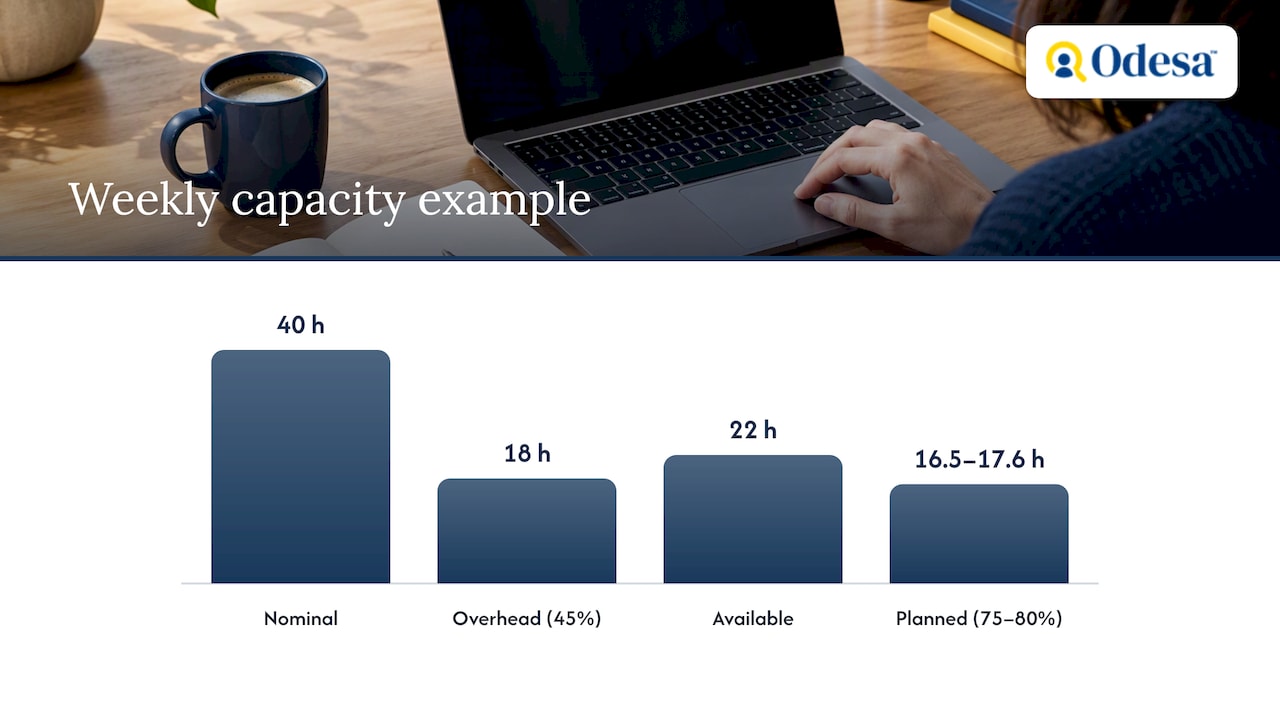
A short worked example makes step 3 and step 4 concrete. Say an engineer has 40 nominal hours in a week. Meeting and overhead time commonly consumes 40 to 50% of a workweek, so assume 45% here: that leaves 22 available hours.
High-performing teams that plan to 75 to 80% of available hours and keep a buffer see better sprint completion rates than teams that plan to 100%. The buffer is not slack, it is the mechanism that keeps a plan from breaking the first time something unplanned arrives.
A short team-run capacity session using a simple template captures these numbers more accurately than a spreadsheet nobody updates, because the people doing the work are the ones filling it in.
Metrics and signals worth tracking
Velocity alone is a weak signal because it rewards volume and says nothing about sustainability or quality. The SPACE framework addresses this by treating developer productivity as multidimensional, covering Satisfaction, Performance, Activity, Communication, and Efficiency rather than a single throughput number.
On the quantitative side, track:
- Available hours versus committed hours, to see if the buffer discipline is actually holding.
- Sprint completion rate, which flags systemic overcommitment when it drifts down over several cycles.
- Cycle time and the percentage of unplanned work, both early indicators of a capacity problem before it shows up in missed deadlines.
Qualitative signals matter just as much: developer satisfaction, recurring technical debt that never gets scheduled, and a rising frequency of on-call pages. DORA’s State of DevOps research ties stable priorities and platform investment to higher-performing teams, which is a useful cross-check when deciding whether a capacity gap is really a staffing problem or a process one.
Pro Tip: When unplanned work exceeds roughly a quarter of committed hours for two sprints running, treat it as a capacity signal, not noise, and revisit the buffer or the hiring plan.
Dashboards and templates without the tooling overhead
You do not need a dedicated platform to run this well. Pull data from four places: issue tracker history, a calendar audit of recurring meetings, time-off records, and on-call rotas. Automating these roll-ups from issue trackers and calendars keeps the model current and turns planning conversations into something backed by evidence rather than opinion.
Three dashboard views cover most needs:
- A per-engineer timeline showing committed work against available hours over the next few sprints.
- A team roll-up comparing total committed hours against a hard capacity cap.
- A “not resourced” backlog column for work that has no owner yet, so gaps are visible rather than discovered late.
A three-column sprint layout, available hours, committed work, and buffer, makes over-allocation visible at a glance and works equally well in a spreadsheet or a dedicated tool. Live capacity views with monthly engineer columns and a not-resourced column have helped teams move prioritization conversations from guesswork to a shared picture.
Someone needs to own keeping the model current, usually the engineering manager or a delivery lead, and the update should take minutes, not hours, each sprint.
A lightweight checklist and meeting cadence
Capacity plans go stale fast without a cheap, repeatable cadence to refresh them.
- Sprint-start capacity check (5 to 10 minutes): confirm available hours per person, review PTO and on-call for the sprint, and compare committed work against the buffer.
- Monthly tactical review: resolve cross-team conflicts over shared engineers, adjust near-term roadmap commitments, and flag any skill gap that has repeated for two or more sprints.
- Quarterly strategic review: revisit headcount needs, platform investment, and whether augmentation or new hires should close a persistent gap.
Include the engineering manager, a delivery or product lead, and, at the quarterly level, whoever owns hiring budget. Update the sprint template weekly, the roll-up dashboard monthly, and the headcount plan quarterly so each artifact stays aligned with the horizon it serves.
How outside engineering capacity fits into the plan
When the five-step process above reveals a persistent gap rather than a one-sprint spike, staff augmentation is often the fastest way to close it without committing to a full-time hire. A staffing partner often combines founder involvement in matching with a network of pre-vetted senior engineers, offering engagement options such as staff augmentation, direct recruitment, and custom development depending on gap duration.
Odesa states its model can save clients up to 53% on hiring costs compared to local rates, a figure worth checking against your own numbers using the Developer Hiring Cost Calculator. When evaluating any augmentation partner, ask how matching actually works, what retention looks like after six months, and whether a trial period exists before a longer commitment. These questions matter more than a sales pitch, because the point of augmentation is to close a real gap, not add a new management burden.
Lessons learned and common pitfalls
The most common failure mode is not a bad formula, it is skipping the accounting step entirely and planning to headcount instead of real hours. A close second is treating the buffer as optional once a deadline gets tight, which guarantees the next sprint inherits the overrun.
Three actions matter more than any dashboard purchase. First, count actual available hours per engineer this week, including meetings and on-call, rather than assuming a clean 40. Third, automate the primary roll-up, even a simple spreadsheet pulling from the issue tracker, so the model survives beyond this sprint.
Teams that treat capacity planning as a five-minute weekly habit outperform teams that treat it as a quarterly ritual, because small corrections are cheaper than large ones. The discipline is unglamorous, which is exactly why most teams skip it until a missed deadline forces the conversation.
Closing short-term gaps with senior engineering support
When your capacity math shows a gap that hiring cannot close fast enough, bringing in senior engineers on a flexible basis is often the more practical route than stretching your current team thinner. Odesa’s staff augmentation service, priced from $45 per hour, places pre-vetted senior engineers from Eastern Europe into your team under terms you control, with the founder directly involved in matching so the fit reflects your actual gap rather than a generic resume match.
For gaps that look permanent rather than temporary, tech recruitment at $7,999 per successful hire is the better fit, and our guide on staff augmentation versus recruitment walks through how to decide between the two. Before committing to any vendor, ask how they vet engineers, what retention looks like past the first quarter, and whether a trial period is available. Check your own numbers against the Developer Hiring Cost Calculator, then start a conversation about staff augmentation to see how a gap could close this quarter rather than next year.
Sources
The SPACE framework supports the multidimensional metrics guidance above. Atlassian’s capacity planning playbook backs the team-run template approach. Rework’s capacity planning guidance supports the buffer rule and available-hours calculation. DORA’s 2024 State of DevOps report informs the metrics and continuous-improvement signals. For a broader look at distributed teams, Offshore Team Productivity: 7 Strategies That Work covers related staffing patterns.
- The SPACE of Developer Productivity: There’s more to it than you think – Microsoft Research
- Capacity Planning: a Step-By-Step Guide and Template | Atlassian
- Capacity planning (guidance): Rework resources
- DORA Accelerate State of DevOps 2024 Report
FAQ
What is a capacity planning engineer?
A capacity planning engineer is typically a role, often within infrastructure or platform teams, responsible for forecasting resource needs and ensuring systems or teams have enough capacity to meet demand. In software engineering management contexts, the equivalent responsibility usually sits with an engineering manager or delivery lead rather than a dedicated title.
What is the difference between capacity planning and resource planning?
Capacity planning focuses specifically on matching engineering hours and skills to upcoming work, while resource planning is a broader term covering budgets, equipment, and allocations across an organization. In practice, engineering teams use capacity planning as the operational layer and resource planning as the umbrella term used by finance and operations.
How much buffer should I build into a sprint?
A common guideline is to plan to roughly 75 to 80% of available hours, leaving about a 20% buffer for interruptions and unplanned work.
How often should I run a capacity check?
Run a quick five to ten minute check at the start of every sprint, a monthly tactical review to resolve cross-team conflicts, and a quarterly strategic review for hiring and platform decisions. This three-tier cadence keeps the plan current without adding meaningful overhead to the team’s schedule.
When should I use staff augmentation instead of hiring?
Staff augmentation tends to fit short- to medium-term gaps where a full-time hire would take too long to find or onboard, while recruitment fits a persistent, long-term need. Odesa offers staff augmentation from $45 per hour for the former and tech recruitment at $7,999 per successful hire for the latter.
Recommended
Reviewed by Val Narodetsky, founder of Odesa.co.