
An async standup is a daily check-in that happens in writing, on each person’s own schedule, instead of on a live call. Team members answer the same short prompts in a shared channel or tool within an agreed window, and everyone reads the results when it suits them. For distributed engineering teams, especially those spread across several time zones, it can replace the daily meeting entirely or reduce it to a few live sessions per week. This guide covers the format, a working update template, the drawbacks, and how to tell whether your async standup is improving coordination or just producing status noise.
TL;DR
- An async standup follows the same agenda as a live one, but updates are posted in writing within a window, not spoken at one fixed time.
- It fits teams with different time zones, different schedules, or a need for uninterrupted focus time.
- The main risk is losing back-and-forth: updates turn into passive reports and blockers sit unanswered.
- Fix that with a posting deadline, a clear blocker flag, a response expectation, and a live meeting on selected days.
- Measure it by blocker resolution time and update specificity, not by participation alone.
Table of Contents
- What an async standup is and how it differs from the live version
- When async fits a software team
- A template for an async update
- How to set up async standups step by step
- The drawbacks and how to address them
- How to tell whether your async standups work
- Our perspective: standups as a trust mechanism for distributed teams
- Building a team that works well asynchronously
- FAQ
- Sources
What an async standup is and how it differs from the live version
A traditional standup is a scheduled, real-time meeting. TechTarget describes it as a short daily meeting, generally limited to five to 15 minutes, used to create transparency, surface roadblocks, encourage collaboration and keep people accountable. The conventional agenda asks what each person did yesterday, what they will do today, and whether anything is in their way.
The Scrum framework frames the same event around the sprint. Scrum.org notes that the purpose of the Daily Scrum is to inspect progress toward the Sprint Goal and adapt the Sprint Backlog, and that it is a 15-minute event for the developers.
An asynchronous version keeps that purpose and agenda. According to G2’s guide for managers, an async standup happens without real-time communication: people share status updates without joining a call or booking a specific time. What changes is the delivery, not the questions.
In practice, three elements define it:
- Fixed prompts. Everyone answers the same questions, so updates are comparable.
- A shared place. A dedicated chat channel, a thread, or a standup tool where the whole team can read and reply.
- A local window. Openbook’s guide points out that instead of one global deadline, async standups use flexible local deadlines, for example “by 11:00 am your time,” so each person posts at a sensible point in their own day.
When async fits a software team
Async is not automatically better. It earns its place under specific conditions. G2 lists the ones that matter for engineering: members working across time zones, people with different schedules, and work that needs uninterrupted focus.
Time zones are the clearest case
If half your team is in California and the other half is in Eastern Europe, a live standup means someone joins at the edge of their day, usually early or late. That cost is paid every day for as long as the team exists. A written update posted at the start of each person’s morning removes it. This is a common situation for US startups that hire senior engineers in Europe, and it is one reason written habits matter so much in those teams. If you are building that kind of team, our guide on how to manage offshore teams covers the wider set of working agreements.
Focus time is the second case
A 15-minute meeting rarely costs 15 minutes. It splits a morning in two. Parabol lists flexibility, timezone inclusion, fewer workflow interruptions and a searchable written record among the advantages of async standups, particularly for people who need long stretches of uninterrupted work. If you want to go further on protecting those stretches, a maker and manager schedule pilot is one way to test the idea over two weeks.
When live is still better
Live standups are useful when a team is new, when a sprint is in crisis, or when people are working on tightly coupled problems. Jason Yip, identified by G2 as a Senior Agile Coach at Spotify, says standups can help teammates share problems and ask one another for help. That help is quicker to request in a conversation. If your team is small, co-located, and already finishes its standup in five minutes, switching may add effort without adding value.
A template for an async update
The quality of an async standup depends almost entirely on the quality of each update. Quely recommends that a useful update state completed work, the next step, blockers or support needed, and relevant context or links to work items, pull requests or documents.
Here is a format that follows that guidance and suits an engineering team:
| Prompt | What a good answer looks like | What a weak answer looks like |
|---|---|---|
| Done since last update | “Merged the retry logic for payment webhooks (PR link). Staging verified.” | “Worked on payments.” |
| Next | “Starting the idempotency keys ticket (ticket link). Expect to open a PR by end of day.” | “More of the same.” |
| Blockers or help needed | “Blocked: need the sandbox credentials from the vendor. @maria can you confirm who owns that?” | “None” (when the ticket has been stuck for three days) |
| Context | “Demo on Thursday depends on this, so I will prioritize it over the refactor.” | Left blank |
Three habits make the template work:
- Name a person on every blocker. A blocker with no addressee is a complaint. A blocker with a name is a request.
- Link the work. A pull request or ticket link lets a teammate check the state in seconds without asking.
- Keep it short. If an update needs more than a few lines, the topic probably belongs in a thread or a call.
How to set up async standups step by step
- Pick the place. Use the channel your team already reads. A new tool that nobody opens will fail faster than any process problem.
- Fix the prompts. Keep to three or four. More than that and people start skipping them.
- Set the window in local time. Ask for updates by a certain hour in each person’s own day, as in the Openbook example above. Add a reminder for people who have not posted.
- Define a blocker flag. Parabol recommends clear blocker flags and a common trigger for contributions. A consistent marker, such as a specific emoji or the word “Blocked,” lets a manager scan the channel in a minute.
- Agree a response time. Writing down how quickly teammates should reply to a blocker is the step most teams skip. Without it, the format has no mechanism for help.
- Run a two-week trial. Treat it as an experiment with a review date, then adjust the prompts, the window and the live meetings.
The middle ground
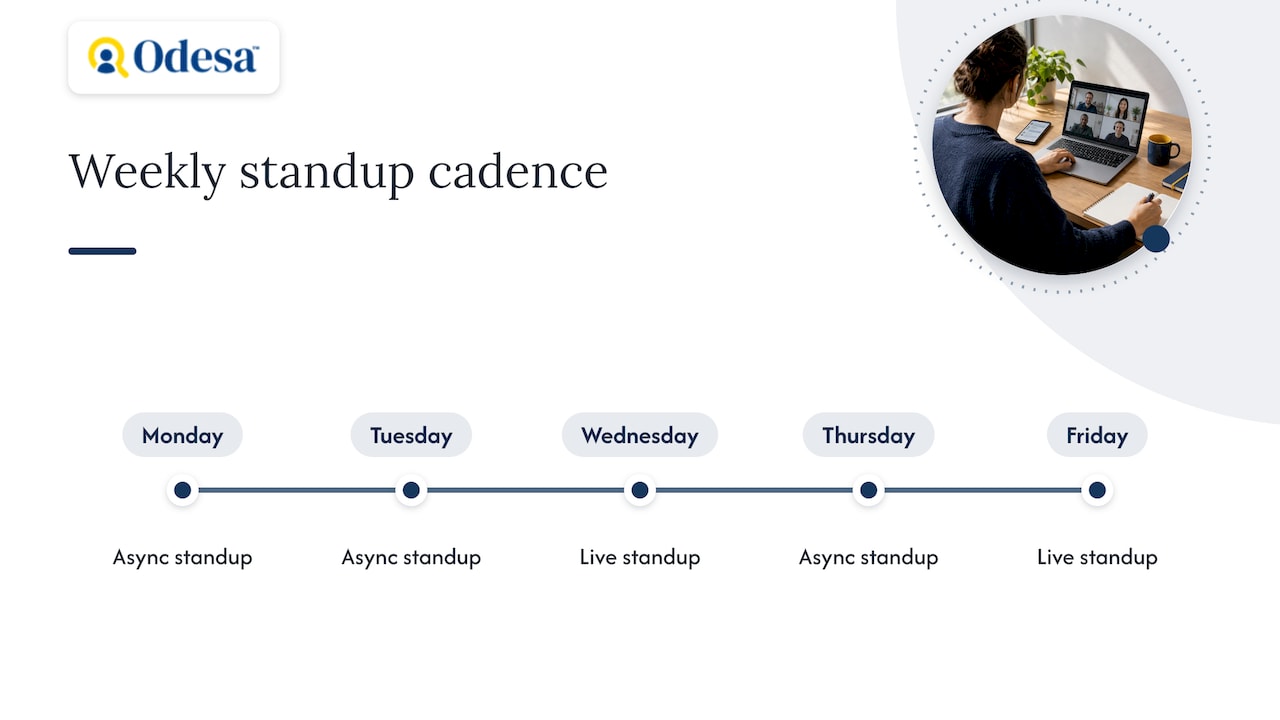
Some teams do not need to choose. LogRocket’s overview describes a middle-ground approach that combines specific days of synchronous meetings with async updates on the others, which can preserve social cohesion and problem-solving speed. A common pattern is async on Monday, Tuesday and Thursday with a live call on Wednesday and Friday. If you do keep live sessions, make sure the calls themselves run well; this guide to video call productivity covers the connection side of that.
The drawbacks and how to address them
The honest downside is reduced interaction. G2 identifies less back-and-forth as a common drawback, which makes it harder to discuss issues in depth or solve problems. Its suggested remedies are practical: set an update deadline, encourage comments and questions, follow up on obstacles, and balance async standups with real-time meetings.
Parker Miller at StandIn describes the common failure as a loss of “resolution,” where updates become passive status reports instead of active coordination signals. In our experience reading team channels, that is the pattern to watch: a wall of tidy updates in which nobody replies to anyone.
Here are the typical failure modes and the response to each:
| Failure | Sign | Response |
|---|---|---|
| Passive reporting | Updates get no replies or reactions | Require a named person on every blocker, and have the manager reply to each one |
| Late or missing updates | Participation drops after the first weeks | Set a clear window, send reminders, and ask about missing updates directly |
| Blockers sit open | The same blocker appears three days in a row | Move it to a short call or thread the same day |
| Loss of team connection | People only talk about tickets | Keep a live meeting on certain days, and a separate channel for non-work conversation |
| Update bloat | Updates run to paragraphs | Cap the length and move detail to linked documents |
One cause of passive reporting is unclear scope: people post updates but nobody knows what the work is supposed to achieve. A tight definition of done upstream helps, and the principles in this content review workflow that starts with a brief apply equally to engineering tickets: agree the brief first and rework falls.
How to tell whether your async standups work
Participation rate is the easy number and the least useful one. People can post every day and still coordinate badly. Better signals focus on whether updates change what happens next.
Enji’s glossary suggests tracking the time from a reported blocker to its resolution, and treating blockers that sit open for 24 hours or more without a response as a sign the format is not reaching the right people. It also suggests watching whether updates reference actual tasks, pull requests or tickets over time. These are heuristics from a vendor’s glossary, not a research finding, so use them as starting points and set your own thresholds.
A practical scorecard for a two-week review:
- Blocker age. How long does the average blocker stay open? Is it falling?
- Reply rate on blockers. What share of blockers get a reply within your agreed response time?
- Link density. Do updates point to pull requests, tickets or documents, or are they vague?
- Surprises at demo or release. Are there fewer last-minute discoveries that someone had known about for days?
- Team sentiment. Ask in a retrospective whether people feel informed and whether they feel isolated. This one is subjective, and it is still the one that tells you when to add a live meeting.
If blocker age is rising and replies are thin, add live time. If the numbers are healthy and people report fewer interruptions, you can reduce live meetings further.
Our perspective: standups as a trust mechanism for distributed teams
We place senior engineers from Eastern Europe with growth-stage companies, mostly US-based, so time-zone overlap is the first constraint we see in every engagement. Our view is that the standup format matters less than the habit underneath it: engineers who write clearly, flag problems early and link their work.
That is why we treat written communication as a hiring criterion, not an afterthought. A senior engineer who can explain a blocker in three precise lines saves a founder more time than one who needs a daily call to be understood. When a client wants to avoid micromanaging, a well-run async standup gives them visibility without hovering, which we cover in our guide to managing offshore developers without micromanaging.
Our recommendation is simple. Start async, keep one or two short live sessions per week for the first month of any new engineer’s onboarding, and let the data from blocker age and replies tell you when you can drop them. A new teammate benefits from voices and faces before they settle into a written rhythm.
— Editorial Team
Building a team that works well asynchronously
Async standups depend on people who communicate in writing with precision and take ownership without prompting. That is mostly a hiring question. If you need senior engineers who fit that way of working, our staff augmentation service starts from $45 per hour, and we match engineers to your team directly with the founder involved. If you are hiring for a permanent role, our tech recruitment is a flat $7,999 per successful hire.
If you want to see how an integrated remote pod works day to day, the Vantex AI case study describes a four-engineer team working at a cost below typical US rates.
FAQ
What is an asynchronous daily standup?
It is a standup where team members post written answers to the same prompts on their own schedule, within an agreed window. The agenda matches a live standup: what was done, what is next, and what is blocking progress. Nobody needs to be online at the same moment.
What are the three standup questions?
The conventional questions are what you did yesterday, what you will do today, and whether anything is in your way. Async teams often rephrase them as done, next and blockers, and add a field for links to pull requests or tickets so teammates can check progress themselves.
Can async standups fully replace live meetings?
For some teams, yes, particularly when members work across time zones. Others do better with a middle ground, combining a few live days with async updates on the rest. If blockers start sitting open for a day or more, or people feel disconnected, add live time back.
How long should an async update be?
A few lines is usually enough: completed work, the next step, any blocker with a named person, and links. If an update needs paragraphs, the topic belongs in a thread or a short call, with the standup post pointing to it.
Sources
- Asynchronous Stand-Up Meetings: A Guide for Managers (G2)
- daily stand-up meeting (TechTarget)
- What is a Daily Scrum? (Scrum.org)
- Async Standups: Why They Beat Daily Meetings for Most Teams (Openbook)
- Virtual vs Async Standups (Parabol)
- Async Standup Meaning, Examples and Setup (Quely)
- Async standups: Pros, cons (LogRocket)
- What Is an Asynchronous Stand-Up? (Enji)
- Why Async Standups Don’t Work (StandIn)
Recommended
- How to Manage Offshore Developers Without Micromanaging
- How to Hire Remote Developers: A Practical Guide
- Why Remote Developer Hiring Fails and How to Fix It
- How to Manage Offshore Teams: A Practical Guide for US Companies
This article may have used AI tools in the writing process. Facts, figures, and recommendations can be wrong or out of date. Do not treat this as professional advice.