
Reproduce the failure reliably using retries with trace-on-first-retry, quarantine the test so it stops blocking merges, then assign ownership and fix the root cause. Guessing at a fix before you have evidence wastes time and often hides the real problem. Prioritize by likely cause class (synchronization, shared state, or external dependencies) and collect traces before you touch any code.
TL;DR:
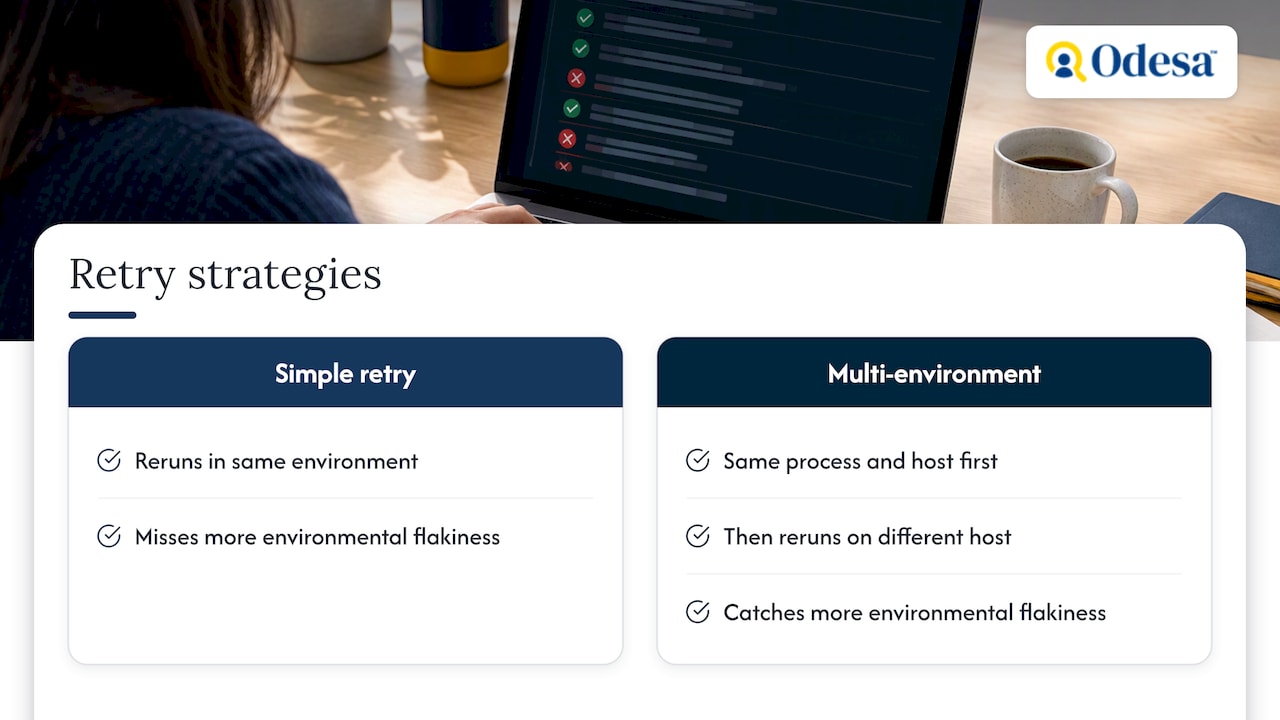
- Rerunning across the same process, same host, and a different host identified up to 90% of flaky failures, versus roughly 25% with simple retries.
- Replace fixed sleeps with explicit waits or polling, use stable selectors, reset test state between runs, and isolate third party dependencies with test doubles.
- Trace only the first retry to capture timelines, errors, and source context without recording every run; compare failed and passing traces after changes.
- Quarantine should unblock merges only when each test has a named owner, a deadline, and an accountability ticket; review the backlog and flaky rate regularly.
- A 1.5% flaky test rate can produce roughly 15 failing tests per run of 1,000 tests, so track flaky rate, repair time, and quarantine backlog.
Table of Contents
- How to identify and reproduce flaky failures reliably
- Common root causes of flaky tests
- Targeted fixes: what to change for each root cause
- Building test-suite habits that prevent flakiness
- CI and tooling strategies that help without hiding problems
- How to verify a fix and measure success
- Impact of flaky tests on software development lifecycle and team productivity
- Communication strategies for reporting flaky tests within teams
- Case studies or examples of flaky test fixes in real-world projects
- Why disciplined triage beats ad-hoc retries
- How we help teams fix flaky test suites
- FAQ
- Sources
How to identify and reproduce flaky failures reliably
Before changing a line of code, confirm you can see the failure happen on demand. Enable retries in continuous integration, but configure tracing to run only on the first retry so you capture a stateful artifact without recording every single run. The Trace viewer in Playwright captures a trace.zip file with the timeline, errors, and source context, giving you a replayable record of what the test actually did.
Reproduction works best when you vary the conditions deliberately rather than rerunning the same test the same way. A few techniques surface timing and race conditions that a single run will never reveal:
- Loop the failing test locally repeatedly to see how often it actually fails.
- Throttle CPU and vary worker concurrency to expose timing-sensitive code paths, a technique Google’s testing team uses to reproduce flakiness that only appears under load.
- Run the test in the same process and host first, then on a different host or a clean worker, since environment-dependent flakiness often only shows up once the environment changes.
That last technique matters more than it sounds. GitHub found that a multi-environment retry strategy, rerunning in the same process, on the same host, and on a different host, identified up to 90% of flaky failures, compared with roughly 25% caught by simple retries alone.
Pro Tip: Keep a running log of every reproduction attempt, including the host, concurrency setting, and whether tracing was on. It turns a guessing exercise into a dataset.
Common root causes of flaky tests
Once you can reproduce a failure, categorize it. Most flaky tests fall into a small number of buckets, and the bucket tells you where to look first.
- Synchronization and timing issues: race conditions, arbitrary sleeps, and tight timeouts are a primary source of flakiness, according to Google’s testing team.
- Shared state or test pollution: static variables, leftover database rows, and singletons that never reset between runs cause one test to quietly affect another’s outcome.
- External dependencies and unstable environments: network calls, third-party APIs, and inconsistent test environments introduce failures that have nothing to do with the code under test, a pattern detailed in Martin Fowler’s writing on non-determinism.
- Resource constraints: CPU contention, disk pressure, or exhausted ports produce failures that look random but trace back to the machine running the test, not the test itself.
- Fragile locators and brittle assertions: selectors that break the moment the DOM or layout shifts are a frequent, often overlooked cause, per the same Google testing guidance.
Knowing which bucket a failure belongs in changes the fix entirely. A sleep-related race condition and a brittle locator look similar in a CI log, but the remediation is nothing alike.
Targeted fixes: what to change for each root cause
A fix only counts as done when it addresses the category you identified, not just the symptom in front of you.
- Synchronization and timing: replace fixed sleeps with explicit waits and auto-retrying assertions. Google’s guidance recommends four synchronization methods: checking for existence, checking for non-existence, waiting for existence with polling, and waiting for non-existence with polling, all of which respond to actual application state instead of a guessed delay.
- Fragile locators: switch to stable, testable selectors and verify them in browser dev tools before they go into a test suite. A locator tied to a CSS class that changes with every design tweak will keep breaking no matter how good your waits are.
- Shared state and test pollution: rebuild test state at the start of every run and enforce strict teardown rather than hoping the previous test cleaned up after itself. Fresh fixtures cost a little more setup time but remove an entire class of order-dependent failures.
- External dependencies: use hermetic test environments or test doubles so a flaky third-party API cannot fail your suite. Add a health check or smoke test that fails fast when a dependency is down, so you get a clear signal instead of a confusing cascade of unrelated failures.
- Resource leaks: add deterministic resource pools (database connections, ports, file handles) and tighten monitoring so a leak shows up as a direct alert rather than an intermittent test failure three stages later.
Pro Tip: Fix one category at a time and rerun your reproduction loop after each change. Fixing locators and synchronization in the same commit makes it hard to tell which change actually solved the problem.
The order above is not arbitrary. Synchronization and locator issues tend to be the cheapest to fix and the most common, so clearing them first often resolves a surprising share of your flaky backlog before you ever touch shared state or external dependencies.
Building test-suite habits that prevent flakiness
Fixing today’s flaky tests matters less than preventing next month’s. A few structural habits keep the problem from coming back.
- Keep your commit and pull-request pipeline small and fast, and move slower, more brittle integration tests into a later stage of the pipeline so they do not block every developer’s merge. Run that slower stage as one of the gates in your software release checklist.
- Make environments hermetic wherever practical, and wrap system clocks so time-dependent tests behave the same way on every run, a practice Martin Fowler recommends for eliminating non-determinism at the source.
- Set a firm ownership and time limit on every quarantined test. A test sitting in quarantine with no deadline and no owner tends to stay there indefinitely, which quietly erodes trust in the whole suite.
- Write clear guidelines on what is worth automating and what is better left to manual verification, since forcing automation onto a volatile, fast-changing part of the product usually produces more flakiness than coverage. Our manual testing guide covers what that verification involves.
None of these habits are glamorous, but they are the difference between a test suite that gets more reliable over time and one that accumulates quarantined tests until nobody trusts the red “X” anymore.
CI and tooling strategies that help without hiding problems
Retries and tracing are useful only when they produce evidence, not when they paper over real bugs. The goal is to use CI mechanics to gather better data, not to make failures disappear from the dashboard.
- Configure retries across multiple environments rather than simply rerunning in place. GitHub’s engineering team found that multi-environment retries catch far more flakiness than naive, same-environment reruns.
- Set tracing to run on first retry only, so you get a usable artifact the moment a test fails without the overhead of tracing every single pass, a pattern Playwright’s documentation supports natively.
- Use a quarantine and deferred compliance workflow: let the merge proceed, but open an accountability ticket with a deadline so the fix does not get forgotten once the immediate pressure is off.
- Track statistics over time, including flaky rate, retry-success percentage, and time-to-fix, so you know which tests deserve attention first.
A 1.5% flaky-test rate can produce roughly 15 failing tests per 1,000-test run, each one consuming developer time to investigate even when the underlying code is fine. That single statistic is why teams at scale treat flaky-test rate as a tracked engineering metric, not an annoyance to tolerate.
How to verify a fix and measure success
A fix is not verified until you have rerun the test enough times to trust the result, not just watched it pass once.
- Re-run the test several times and classify each result as passed, flaky (failed then passed on retry), or failed, following the categorization approach Google’s testing team uses internally.
- Compare the trace and logs from a failing run against a passing run to confirm the specific cause you identified is actually what changed, not a coincidental pass.
- Track flaky-test rate over time, mean time to repair for flaky tests, and the size of your quarantine backlog so you can see whether the fix held up past the first week.
If the test passes cleanly across every rerun condition you used during reproduction, same host, different host, varied concurrency, you have strong evidence the fix addressed the real cause rather than just the symptom you happened to see first.
Impact of flaky tests on software development lifecycle and team productivity
Flaky tests cost more than the few minutes it takes to rerun a failed build. Every flaky failure forces an engineer to stop, investigate, and decide whether the code is broken or the test is lying, and that investigation time adds up fast across a team. Google’s testing team notes that flaky tests raise investigation costs and, worse, can mask real production bugs when engineers start assuming every red result is just noise.
That assumption is the real danger. Once a team learns to distrust its test suite, people start re-running failed builds automatically without reading the failure, merging past red checks because “it’s probably just flaky,” and losing the early-warning value that automated testing exists to provide in the first place. A suite that cries wolf often enough gets ignored right up until it catches something real.
The slowdown compounds across the development lifecycle. Code review stalls while someone chases a failure that has nothing to do with the change under review. Release schedules slip because a quarantine backlog grows faster than anyone clears it. New engineers lose confidence in the pipeline during onboarding, when a flaky failure on their first pull request teaches them the wrong lesson about how much to trust CI. None of this shows up as a single dramatic outage. It shows up as a slow accumulation of friction that makes every release a little slower and every engineer a little more skeptical of the tools meant to help them.
Treating flaky-test rate as a tracked metric, the same way teams track deployment frequency or incident count, keeps this cost visible instead of letting it hide inside everyone’s individual frustration.
Communication strategies for reporting flaky tests within teams
A flaky test that nobody reports stays flaky indefinitely. The first communication habit worth building is a low-friction way to flag a failure as suspected flakiness the moment it happens, rather than waiting for a retrospective or a frustrated Slack message three sprints later.
A short, structured report works better than a vague complaint. When an engineer files a flaky-test ticket, it should include the test name, a link to the failing CI run, the trace or log artifact if one was captured, and a note on whether it reproduced locally. That small amount of structure turns a one-line complaint into something the owning engineer can actually act on without having to reconstruct the context from scratch.
Ownership matters as much as the report itself. A ticket with no assigned owner tends to sit untouched, so pairing every quarantined test with a named engineer and a deadline, the same deferred compliance pattern used for CI merges, keeps accountability clear. Regular reviews of the quarantine backlog, even a short check during a standing engineering sync, prevent the list from growing past the point anyone wants to tackle it.
Finally, share the data, not just the tickets. A simple dashboard showing flaky-test rate, time-to-fix, and quarantine backlog size gives the whole team visibility into whether the problem is improving or quietly getting worse, and it turns an individual engineer’s frustration into a shared, trackable goal.

Case studies or examples of flaky test fixes in real-world projects
Large engineering organizations have published concrete data on what worked when they tackled flaky tests at scale, and the lessons translate well to smaller teams. GitHub’s engineering team addressed flaky builds by changing how retries were structured, not just how often tests reran. Moving from a simple same-environment retry to a multi-environment retry strategy that reruns a failing test in the same process, on the same host, and then on a different host let them catch far more environmental flakiness than the naive approach ever could.
Google’s testing organization has published similar lessons from a different angle, focusing on root-cause categories rather than retry mechanics. Their testing blog traces most flakiness back to two weaknesses: poor locator strategies and poor synchronization strategies, and their recommended fix, replacing arbitrary sleeps with explicit wait-and-poll methods, is specific enough that any team can apply it directly to their own suite.
The common thread across both examples is that neither company solved flakiness by retrying harder. They solved it by building better diagnostic infrastructure first, tracing, multi-environment reruns, and categorization frameworks, and only then applying targeted fixes. A team evaluating its own flaky-test backlog can borrow the same sequence: invest in reproduction and evidence before deciding what to change.
Why disciplined triage beats ad-hoc retries
Reproduce, isolate, fix, verify. That order reduces time to a durable fix more reliably than reaching for retries first and hoping the problem goes away. The discipline matters most on large, legacy suites where root causes hide behind years of accumulated shortcuts. Bringing in senior QA automation engineers or a focused Human QA engagement for a short stretch often speeds diagnosis precisely because experienced testers have already seen these failure patterns before.
How we help teams fix flaky test suites

When a flaky suite needs attention faster than your current team can give it, we offer engagements such as a Human Release Check or Release Check + Real Users to triage a flaky suite and verify that fixes actually held. For remediation work, our staff augmentation model adds senior engineers directly into your team. We scope every engagement the same way: audit the suite, triage by root cause, apply prioritized fixes, then verify. Get in touch to scope your audit.
FAQ
What is a flaky test?
A flaky test is one that produces both passing and failing results across multiple runs of the exact same code, with no changes to the code itself. The inconsistency usually traces back to synchronization issues, shared state, external dependencies, or resource constraints rather than an actual defect in the application.
How will you handle flaky tests?
Reproduce the failure reliably first, using retries with tracing enabled on the first retry, then quarantine the test so it stops blocking merges while someone is assigned to fix it. From there, categorize the root cause and apply a targeted fix, such as replacing sleeps with explicit waits or rebuilding shared test state, following the sequence Google’s testing team recommends.
What does the message “Nx detected a flaky task” mean?
This message means the build tool reran a task and got a different result than the first attempt, which it flags as suspected flakiness rather than a confirmed failure. It is a prompt to investigate the task’s logs and traces, not a definitive diagnosis of the underlying cause.
What are the challenges in testing?
The main challenges include distinguishing real defects from environmental noise, maintaining stable test environments, and keeping a suite fast enough that developers do not start ignoring its results. Flaky tests compound all three, since they raise investigation costs and can mask genuine production bugs once a team stops trusting red results.
How many times should I rerun a test to confirm it is fixed?
There is no universal number, but many teams use a fixed policy of multiple reruns and classify each result as passed, flaky, or failed to build confidence in a fix. Comparing trace data from before and after the fix adds further confirmation that the root cause, not just the symptom, has been addressed.
Sources
- Reducing flaky builds by 18x – The GitHub Blog
- Google Testing Blog: Test Flakiness – One of the main challenges of automated testing (Part II)
- Trace viewer | Playwright
- Eradicating Non-Determinism in Tests
Recommended
Reviewed by Val Narodetsky, founder of Odesa.co.