
A good bug triage process turns every incoming defect report into a clear, accountable next step: an owner, a severity, a confidence level on reproduction, and a route to resolution. This article lays out a repeatable workflow, SLO-based decision rules, and the operational checklists that let a team process bug reports without stalling delivery.
TL;DR:
- A structured triage process assigns clear severity, scope, reproduction confidence, and ownership to each bug to prevent backlog noise and improve resolution speed.
- Implementing a consistent workflow with intake, validation, deduplication, categorization, prioritization, and assignment optimizes team efficiency and scales across organizational sizes.
- Applying SLO-based timing rules, such as resolving P0 issues within one week, and using environment-aware severity assessments improve triage accuracy for critical vulnerabilities.
- Automation like auto-labeling and duplicate detection reduce busywork, but final priority and security severity decisions must remain human-led to avoid costly errors.
- Regular metrics tracking, tiered triage models, and rotational ownership help teams maintain triage health and handle increasing defect volume effectively.
Table of Contents
- What bug triage is and the outcomes teams should expect
- Step-by-step triage workflow you can implement today
- Prioritization frameworks and SLO-driven decision rules
- Roles, ownership, and a sample triage meeting agenda
- Tools, automation, and AI-assisted triage: what to automate safely
- Security vulnerability triage and environment-aware severity
- Metrics and SLAs for triage health
- Scaling triage: tiered models, ML-assisted assignment, and governance
- What adoption actually looks like in practice
- How Odesa supports teams that need triage capacity fast
- FAQ
- Sources
What bug triage is and the outcomes teams should expect
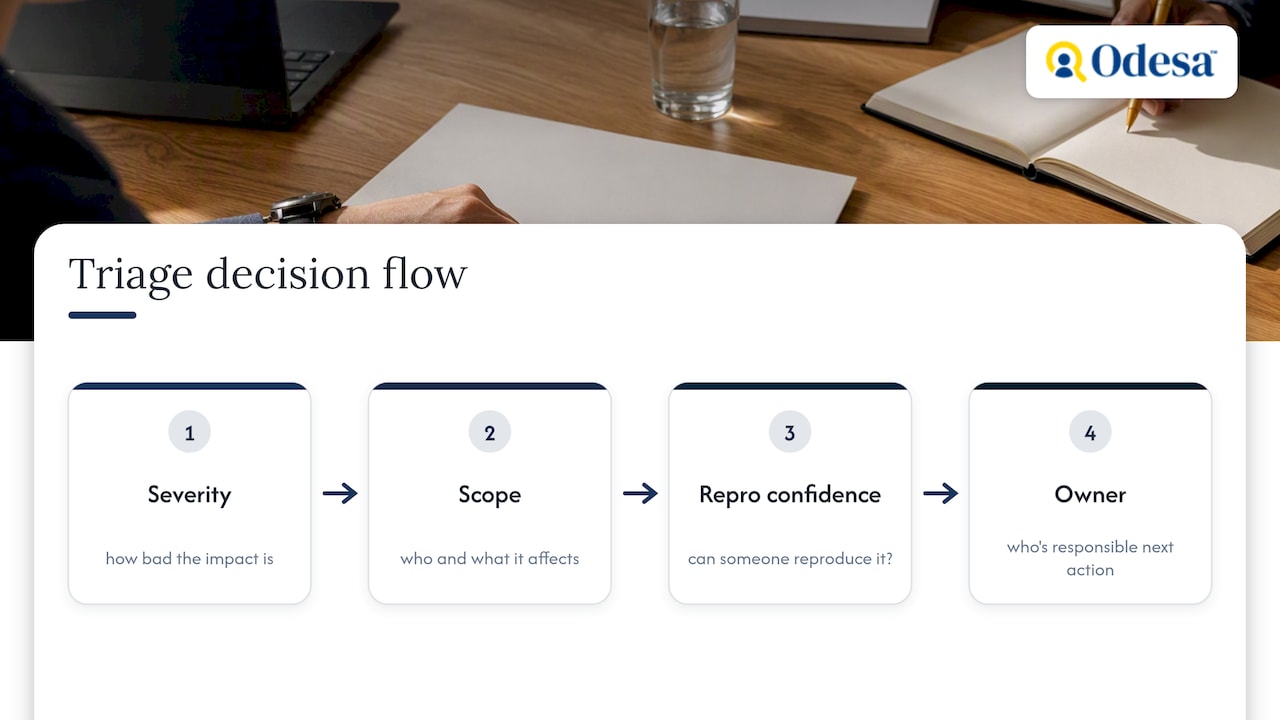
Bug triage is the process of reviewing incoming defect reports and deciding what happens to each one next. A triaged report has four things attached to it: severity (how bad the impact is), scope (who and what it affects), reproduction confidence (whether someone else can make it happen), and an owner responsible for the next action. Without those four, a bug sits in a queue generating noise instead of progress.
Teams that triage well avoid constant firefighting because engineers spend their time on fixes that matter, not on reports that turn out to be duplicates, misconfigurations, or low-impact edge cases. Roadmap commitments survive contact with the defect backlog instead of getting quietly eaten by it.
Three failure modes show up repeatedly: triage meetings that review every bug instead of just the ones that need a decision, reports assigned to an owner with no priority attached (so nothing happens), and no revisit mechanism, which lets “needs more info” become a permanent label rather than a temporary one.
Step-by-step triage workflow you can implement today
A repeatable workflow beats ad hoc judgment calls, and it scales from a three-person team to a multi-squad organization. The sequence below works whether triage happens daily or twice a week.
- Intake: every report requires a title, steps to reproduce, expected versus actual behavior, environment details, and attachments (logs, screenshots, or a recording).
- Validate: someone attempts reproduction and marks the report as confirmed, inconclusive, or not reproducible before it moves forward. Failures that pass on retry often point to flaky tests rather than product bugs.
- Deduplicate: search existing open reports by error signature, affected component, and symptom before creating a new ticket or escalating one.
- Categorize: tag the report by type (crash, regression, UX, performance, security), affected component, and customer impact tier. Findings from business reviewers during acceptance testing belong in the same queue; see UAT vs QA for who owns each.
- Prioritize: apply your severity and priority rules, and attach an explicit next action, not just a label.
- Assign: route to an owner with the authority and context to act, and mark the ticket as triaged only once owner, priority, and next action are all set.
A report that lacks a clear repro path is not “triaged,” it is “needs more info,” and that distinction matters for queue health. The GitLab triage handbook defines this kind of completion criteria explicitly through labeling rules, including partial triage states and backlog classification, which keeps the backlog from filling with reports nobody has actually evaluated.
Minimum fields worth enforcing through an issue template:
- Steps to reproduce, numbered and specific.
- Expected result versus actual result.
- Environment (OS, browser or app version, device).
- Logs, stack traces, or screen recordings when available.
- Customer or account impact, if known.
Enforcing this template at intake, rather than chasing details after the fact, is one of the highest-leverage changes a team can make to triage speed.
Prioritization frameworks and SLO-driven decision rules
Severity measures how bad a bug is; priority measures how soon someone should fix it. A crash affecting 2% of users might be high severity but lower priority than a billing error affecting a smaller group under an enterprise SLA. Treating the two as interchangeable is a common source of triage disputes.
A simple priority matrix resolves most disagreements by combining severity with scope. Ties get broken by a fixed order: contractual SLA breaches first, then security exposure, then number of affected users, then roadmap commitments.
| Priority | Typical trigger | Response expectation |
|---|---|---|
| P0 | Crash, data loss, outage | Daily updates, fixed within 1 week |
| P1 | Major feature broken, no workaround | Weekly updates, fixed within 4 weeks |
| P2 | Degraded experience, workaround exists | Scheduled into normal sprint work |
| P3/P4 | Cosmetic or low-impact issue | Backlog, fixed opportunistically |
Chromium’s documented SLOs set P0 issues to require updates every business day and resolution within one week, with P1 issues updated weekly and resolved within four weeks, according to Chromium’s priorities and SLO documentation. That timing structure is a useful starting template even for teams with no public-facing release cadence.
Error budgets add a layer most triage processes skip: when reliability consumption crosses a threshold, Google’s SRE guidance recommends a written policy that pauses feature launches and redirects engineering time to reliability work until the budget recovers. Deciding that policy before an incident happens, not during one, keeps prioritization defensible.
Roles, ownership, and a sample triage meeting agenda
Clear ownership prevents the most common triage failure: a bug with a priority but no one actually working it. A directly responsible individual, or DRI, owns the outcome of a specific bug from triage through resolution, even if the actual fix gets delegated. A triage lead runs the meeting and keeps decisions moving; component owners provide the technical judgment on severity and feasibility within their area.
Cadence depends on volume and risk. Daily 15-minute syncs work for actively shipping teams handling live incidents; weekly deeper sessions suit teams with a lower bug inflow rate or longer release cycles. Many teams run both: a daily stand-up for anything urgent, and a weekly session for backlog grooming.
A workable 30 to 60 minute agenda:
- Review new intake since the last meeting, confirming reproduction status.
- Escalate anything that looks like a P0 or security issue immediately, out of normal queue order.
- Assign owners and priorities to everything else.
- Confirm action items from the previous meeting got done, not just assigned.
- Document decisions in the ticket itself, not just in meeting notes, so the reasoning survives beyond the room.
Short, frequent, and timeboxed sessions consistently outperform long infrequent reviews, a pattern the GitLab handbook reflects in its own recommendation for favoring small, repeatable triage windows over large batch reviews.
Tools, automation, and AI-assisted triage: what to automate safely
Modern bug trackers and AI layers on top of them can handle a meaningful share of triage busywork: auto-labeling by component, duplicate detection based on error signatures, suggested assignees based on past ownership, and auto-generated summaries of long threads.
What automation should not do unsupervised is make the final call on priority or security classification. Those decisions carry consequences that a wrong label does not surface until much later.
- Auto-labeling and duplicate detection save the most time with the least risk, since mistakes are cheap to catch.
- Suggested assignees work well as a starting recommendation, not a binding assignment.
- Auto-summaries help reviewers scan long threads faster without replacing human judgment on impact.
- Final priority and security severity decisions stay with a human triage lead.
Build an abstention policy into any automated suggestion system: when confidence is low, the tool should flag “unsure” rather than guess, which keeps developers from chasing bad recommendations. This mirrors the abstention and patch-critic approach described in research on reducing noise in automated program repair, where filtering low-confidence suggestions improved overall output quality.
Pro Tip: Roll out automation on one label type at a time, and measure its error rate for two weeks before trusting it for anything that touches priority or assignment.
Teams deciding whether to build this tooling in-house or buy an existing solution can start with a vendor-neutral framework like Westcode before committing engineering time either way.
Security vulnerability triage and environment-aware severity
Security reports need a separate, faster lane from general bug triage, because a delayed fix carries different risk than a delayed feature bug. Route anything flagged as a potential vulnerability directly to a security owner, bypassing the normal queue order.
CVSS scores alone can misrepresent actual risk, because the same vulnerability can behave very differently depending on the environment it runs in. Research on environment-aware differential severity analysis found numerous vulnerabilities with different severity ratings between Android and Linux, using static analysis and language-based mapping to show how a single CVE can carry meaningfully different real-world risk depending on the OS derivative it runs on. A team relying on the generic CVSS score without checking how it manifests in their own stack can end up over- or under-prioritizing a fix.
Operational steps worth adopting:
- Route suspected vulnerabilities to a named security owner immediately, not through the standard triage queue.
- Set short SLOs for vulnerability triage, measured in hours rather than days for anything critical.
- Limit disclosure of vulnerability details to the people actively working the fix until a patch ships.
- Re-evaluate severity against your actual deployed environment rather than accepting a vendor’s CVSS score as final.
Metrics and SLAs for triage health
A handful of metrics tell you whether triage is actually working: time-to-first-triage (how long a report sits before someone acts on it), time-to-assignment, reproduction-confidence rate (the share of reports confirmed versus stuck in “needs info”), and mean time to resolution, or MTTR.
- Time-to-first-triage should stay within hours for P0/P1 reports and no more than a few business days for lower priority items.
- A rising share of “needs more info” tickets usually signals a weak intake template, not an unusually confusing bug.
- MTTR trending upward over several sprints is an early signal of either understaffed triage or an unclear ownership model.
Chromium’s published SLO of resolving P0 issues within one week and P1 within four weeks, per its priorities and SLO documentation, gives teams a concrete benchmark to compare their own MTTR against, even outside a browser engineering context.
Scaling triage: tiered models, ML-assisted assignment, and governance
As report volume grows, a single triage meeting stops scaling. Larger organizations typically move to a tiered funnel: a first-pass filter handles deduplication and basic categorization, while a smaller group of senior reviewers handles priority calls and cross-team escalations.
Automated assignment gets more accurate as it incorporates signals beyond keyword matching. Recent work on integrating developer capability with tossing-graph data shows that combining individual skill signals with historical reassignment patterns improves recommendation accuracy over either approach alone, which matters once manual routing becomes a bottleneck.
- Rotate triage duty across senior engineers rather than assigning it permanently to one person, to avoid burnout and single points of knowledge.
- Audit a sample of “triaged” tickets monthly to confirm priority and ownership decisions were actually followed through.
- Prioritize by team capacity as well as severity: a correctly triaged P1 with no one available to fix it is still stuck.
What adoption actually looks like in practice
Most teams overestimate how much process they need before seeing results. Mandating steps-to-reproduce, naming a DRI for every open P0 or P1, and running a short daily sync will fix more backlog health problems than a sophisticated tool rollout. Bring in external QA or staff augmentation when a capacity spike or a missing senior triage lead is the actual blocker, not the workflow itself. Early automation should favor speed over strictness, then tighten as confidence grows.
How Odesa supports teams that need triage capacity fast

When the gap is capacity, not process, bringing in experienced hands beats building more internal tooling. Odesa’s Ongoing Human QA service gives teams a dedicated reproduction and verification layer during a backlog surge, while a Human Release Check works well for a one-time pre-release triage sweep. For teams that need a senior engineer to own triage as a DRI long-term, staff augmentation places a pre-vetted engineer into the team directly, with the founder personally involved in matching so the fit works from day one. Check availability through the staff augmentation page to see what senior capacity could do for your current backlog.
FAQ
What are the 5 stages of triage?
In software bug triage, the common stages are intake, validation, categorization, prioritization, and assignment, each producing a decision the next stage depends on. Skipping validation or categorization is the most common reason bugs sit unresolved despite having an assigned owner.
How many bugs per 1,000 lines of code should I expect?
Defect density varies widely by codebase, language, and testing maturity, so there is no single reliable figure to target. Teams get more value tracking their own trend over time (bugs found per release or per sprint) than comparing against an external benchmark.
What is a bug triage agent?
A bug triage agent is an automated or AI-assisted system that handles parts of the triage workflow, such as labeling, duplicate detection, or suggesting an assignee based on past ticket history. Current approaches work best as a recommendation layer that a human reviewer confirms, rather than a fully autonomous decision-maker, particularly for priority and security calls.
What does triage mean in bug bounty?
In a bug bounty context, triage means verifying a submitted vulnerability report, confirming it reproduces, assessing its real-world severity, and routing it to the right internal owner before a reward decision is made. Because the same vulnerability can carry different risk depending on environment, environment-aware severity analysis is increasingly used to avoid over- or under-rating a submitted report based on CVSS alone.
Sources
- docs/process/priorities_slo.md – chromium/src.git – Git at Google
- Google SRE – Implementing SLOs
- OS-Aware Vulnerability Prioritization via Differential Severity Analysis
- Issue Triage | The GitLab Handbook
Recommended
- How to Manage Offshore Teams: A Practical Guide for US Companies
- How to Hire Remote Developers: A Complete Guide for Growing Teams
Reviewed by Val Narodetsky, founder of Odesa.co.