
A release testing checklist is a short, repeatable list of checks that a build must pass before it reaches production: confirm exactly what is shipping, prove the build is sound, run the right tests, verify the environment, and make sure you can roll back. This guide gives you that list in five gates, with the post-deploy checks and sign-off rules that keep it useful. It also shows how to scale it so a one-line fix does not get the same ceremony as a database migration.
TL;DR
- Run every release through five gates: scope, build, tests, environment, and rollback and monitoring.
- Do not rely on pass rate alone. An unresolved defect in a business-critical flow can block a release even when 98% of tests pass.
- Define rollback triggers and monitoring thresholds before you deploy, not during the incident.
- Split checks into mandatory baseline items and conditional items that depend on what changed.
- Assign each check an owner and mark it release-blocking or advisory.
Table of Contents
- The five gates at a glance
- Gate 1: Scope, or what exactly is shipping
- Gate 2: Build integrity
- Gate 3: The test pass
- Gate 4: Environment readiness
- Gate 5: Rollback and monitoring
- Sign-off: when the checklist says ship
- After the deploy: first-hour checks
- Scale the checklist to the size of the release
- Our perspective on release testing
- Get a human pass on your next release
- A reusable checklist you can copy
- FAQ
- Sources
The five gates at a glance
Most release checklists ranking for this topic share the same skeleton: scope, build, deploy and communicate. We find it easier to run as five gates, because each gate has one question and one owner.
| Gate | Question it answers | Typical owner |
|---|---|---|
| 1. Scope | Do we know exactly what is shipping? | Release manager or tech lead |
| 2. Build | Is the artifact sound and traceable? | Engineering / CI |
| 3. Tests | Does it work, and did it break anything? | QA and developers |
| 4. Environment | Is production ready to receive it? | DevOps or platform engineer |
| 5. Rollback and monitoring | Can we see problems and undo the change? | On-call engineer |
A release stops at the first gate that fails. Ordering matters: put the fastest, most likely to fail checks first, so developers get feedback in minutes. This is the same quality-gate ordering described in the Software Engineering Guide’s chapter on CI/CD, which orders pipeline stages from fastest and most likely to fail to most thorough.
We have a longer walkthrough of the same idea in our software release checklist with five gates, rollback and human checks. What follows is the testing-focused version.
Gate 1: Scope, or what exactly is shipping
Teams skip this gate because it feels administrative. It prevents the most embarrassing failures: testing one build and shipping another.
- Identify the exact change. Record the commit, branch, tag or artifact that will ship. A release candidate that cannot be named cannot be tested.
- Confirm code is in version control and tagged. Deployment readiness includes code checked in and tagged appropriately, as Capital One’s engineering team describes in its release checklist.
- List what changed in user terms. New features, changed behavior, removed behavior. This list drives the conditional checks in later gates.
- Check the definition of done. Each story should have written unit tests, passed functional tests, and any known technical debt documented. If acceptance criteria were vague, testers cannot verify them; our guide to writing acceptance criteria teams can test covers how to fix that upstream.
- Confirm code review is complete. Every change in the release should have had a peer review before it was merged. See our code review guidelines for a practical standard.
Gate 2: Build integrity
The principle is simple: build once, promote the same artifact everywhere. The Microsoft Engineering Fundamentals Playbook says to promote the deployable artifact created at the CI stage across environments, rather than rebuilding for each environment. Rebuilding introduces differences you did not test.
Checks for this gate:
- The build is produced by the CI pipeline, not from a developer’s laptop.
- Unit tests pass and coverage has not dropped below the team’s agreed level.
- Dependencies are pinned and scanned for known vulnerabilities.
- The artifact is versioned and traceable to the commit from Gate 1.
- Flaky tests are investigated rather than silently retried. A retry that hides an intermittent failure hides a real defect too; we cover the cause-first approach in fixing flaky tests before blind retries.
Gate 3: The test pass
This is the core of any release testing checklist. The question is which test types belong, and how deep each should go. Capital One’s checklist calls for automated functional tests for new features and regression, performance testing under heavy load, and scans for OWASP vulnerabilities. A release validation guide from ONES groups the work into four areas, which we find a practical way to organize a test plan.
Functional and regression tests
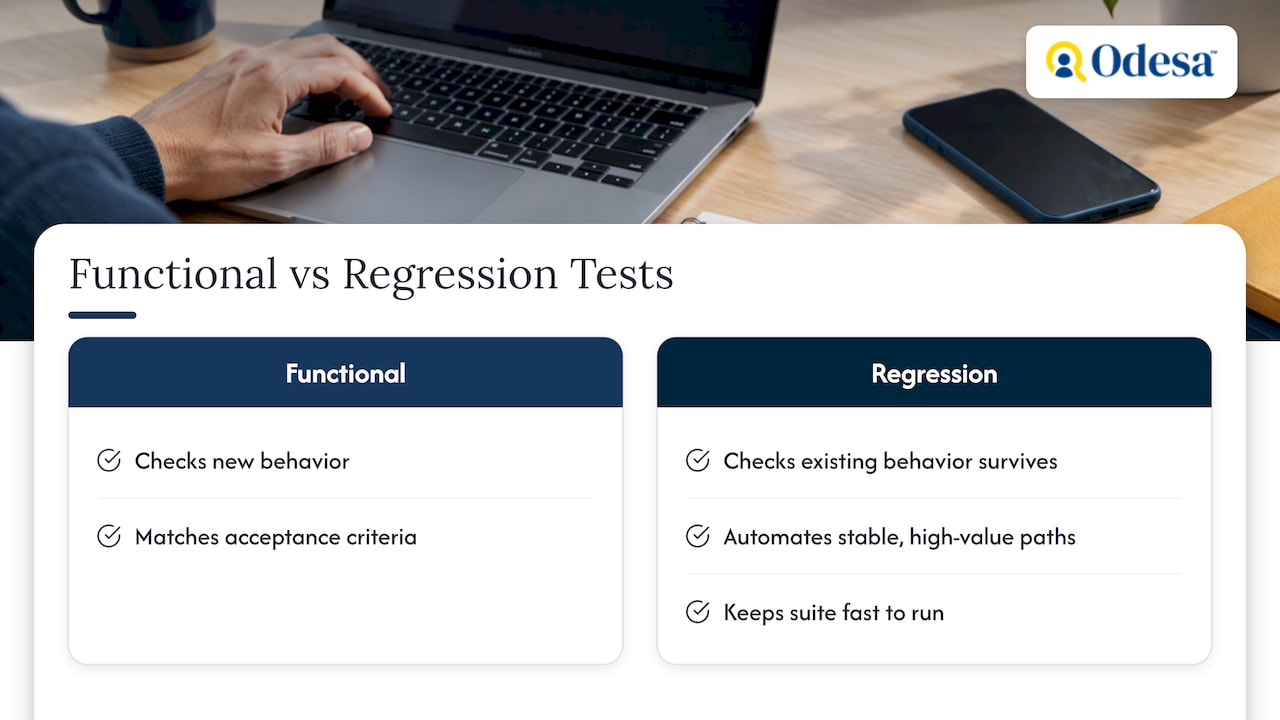
Functional tests confirm the new behavior matches the acceptance criteria. Regression tests confirm existing behavior survived. Automate regression for stable, high-value paths: sign-up, login, checkout, core API calls, billing. Keep the suite fast enough that developers actually run it.
A question we hear often is whether to run a bug bash or a regression pass. They answer different questions, and our comparison of bug bash vs regression testing explains when each earns its time.
Integration and end-to-end tests
Unit tests do not prove that services work together. Integration and end-to-end tests confirm that service boundaries hold and that complete user journeys finish. Prioritize the handoffs: payment providers, authentication, email delivery, third-party APIs, webhooks.
Performance and reliability tests
Check response times and load handling against a baseline, and check how the system recovers after a failure. Compare against the previous release rather than an abstract number. If your P95 latency doubled in staging, that is a finding even if no test failed.
Security checks
Security validation belongs before every production release, not once a year. The checks most checklists include are:
- Dependency vulnerability scanning.
- Review against the OWASP Top Ten categories, including injection and cross-site scripting.
- Access control checks on new endpoints and changed permissions.
- Confirmation that logs and API responses do not expose sensitive data.
- Security headers such as Content-Security-Policy and HSTS.
If your team does not have a dedicated security specialist, structured security vulnerability assessment training can help engineers run these reviews with more confidence.
Usability, accessibility and compatibility
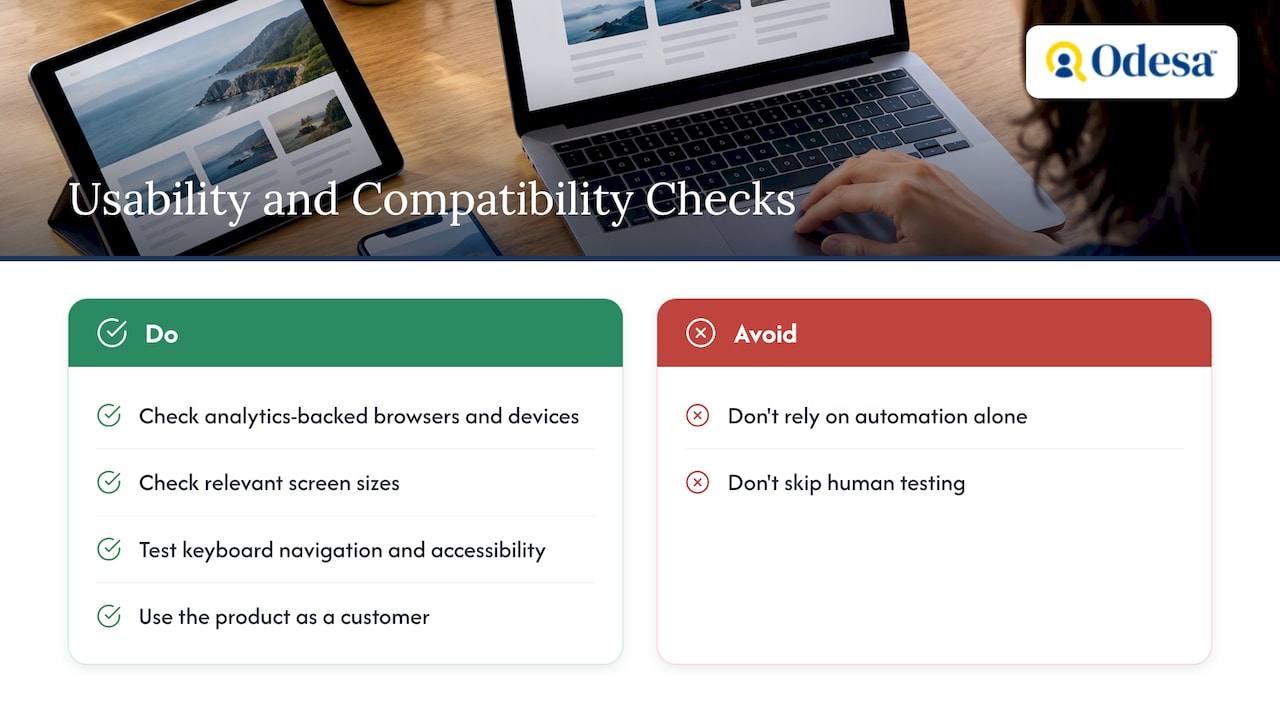
Check the supported browsers, devices and screen sizes that your analytics show matter. Include keyboard navigation and basic accessibility checks for any changed interface. Automated tools miss a great deal here, which is why a person using the product the way a customer would still earns a place on the checklist. Our exploratory testing guide shows how to structure that time with charters.
Human checks
Automation verifies what you already thought to check. A human tester finds what you did not. Before a release, we recommend at least one session where someone who did not write the code walks through the critical flows on a production-like build, looking for confusing copy, broken states and awkward edge cases. This is the reasoning behind our Human QA offering, covered below.
Gate 4: Environment readiness
Many release failures are not code defects. They are a missing secret, a wrong config value or a dependency that was not deployed. Run these checks:
- Configuration. Production configuration is updated and matches what the release expects.
- Secrets. Secrets are held in a key and secret store and are consistent across environments, as the Microsoft playbook recommends.
- Dependencies. Services the release depends on are deployed in production and ready to take traffic, a point also made in Capital One’s checklist.
- Test data. Staging data resembles production in shape and volume.
- Release candidate validated in test. The candidate has been exercised in the test environment before it goes anywhere near production.
Database migrations
Migrations deserve their own mini-checklist because they are the hardest change to undo. Drawing on a database change checklist from Florence and a production deployment checklist from QAPractices:
- Classify the migration as additive, destructive or data-transforming.
- Separate schema rollout from code rollout where possible, using an expand, migrate, contract pattern.
- Estimate impact: large table rewrites, locks, index builds and backfills.
- Verify backward compatibility, so the old code still works against the new schema.
- Test the migration in staging with production-like data volumes.
- Schedule it for a lower-risk window and take a backup immediately before.
- Write down a rollback or forward-fix plan. If rollback is unsafe, document the alternate recovery path.
Gate 5: Rollback and monitoring
The last gate answers two questions: can we see trouble quickly, and can we undo the change?
Rollback readiness
A workable rollback plan has validated recovery steps, tested database reversals where they exist, and measurable trigger conditions. QAPractices lists all three as required parts of a robust plan. In practice:
- Write the exact steps so any team member can execute them, not just the engineer who built the release.
- Rehearse the rollback on staging.
- Decide the triggers in advance, for example an error rate at a multiple of baseline or a P95 latency above a set threshold.
- Know your time budget: how long a feature flag flip, a redeploy and a database rollback each take.
Feature flags are the cheapest rollback available. If a risky feature ships behind a flag, “rolling back” is turning it off.
Monitoring thresholds
Define alert thresholds before deployment so the decision during an incident is mechanical. One example from StackPractices is an error rate above 1% sustained for five minutes. The right number for your product depends on your baseline; the discipline of writing it down first does not.
Sign-off: when the checklist says ship
A checklist without a decision rule becomes a ritual. Use these rules:
- Do not rely on pass rate alone. BrowserStack’s QA setup guide notes that readiness should also weigh unresolved defects, affected business-critical flows, blocked tests and known limitations. A high pass rate can still carry unacceptable risk if one critical function is broken.
- Classify every open defect as blocking, shippable with a known limitation, or deferred. Write the known limitations into the release notes.
- Name one approver. Explicit human sign-off, with a name and a time, beats a shared sense that things look fine.
- Keep QA and acceptance separate. Internal QA checks the build against requirements; user acceptance confirms the business accepts it. Our breakdown of UAT vs QA release decisions shows who should own each.
After the deploy: first-hour checks
Release testing does not end at deployment. Testsigma’s release guidance recommends production smoke tests on key user flows, monitoring and user feedback channels. Run them in this order:
- Smoke test login, checkout or your core transaction, and critical APIs on production.
- Compare error rates, timeouts and latency against the pre-deployment baseline.
- Watch infrastructure: CPU, memory, database query performance and background jobs.
- Watch business metrics such as sign-ups, conversion or order volume, which catch problems that technical metrics miss.
- Keep support and feedback channels open and tell support what shipped.
- Record the outcome. If the release was clean, note it. If not, hold a short review and update the checklist.
Scale the checklist to the size of the release
Treating every release the same wastes time on small changes and under-protects large ones. A risk-based release gate uses baseline controls for every release and adds controls based on what changed. Applied to this checklist:
| Change type | Baseline gates | Add |
|---|---|---|
| Small, isolated fix | 1, 2, 3 (smoke and affected regression), 5 | Nothing further |
| Database migration | All gates | Migration checklist, backup, rollback assessment |
| Authentication or permissions | All gates | Security review, targeted regression |
| Critical dependency update | All gates | Compatibility evidence, performance comparison |
| Major user-facing feature | All gates | Human exploratory pass, accessibility check, staged rollout |
Keep one shared checklist in version control. Separate mandatory checks from conditional ones, link each check to a pipeline job or an owner, and mark each as release-blocking or advisory. Review it after every significant incident, as Tester.live suggests, so lessons become checks.
Our perspective on release testing
We work with growth-stage teams that ship quickly, and the pattern we see is consistent: automation is usually in better shape than the human side of release testing. Pipelines run unit tests and regression suites, yet nobody who is unfamiliar with the code uses the product before it goes live.
That gap is why we built Human QA as a distinct service. A fresh pair of eyes on a release candidate catches confusing flows, copy errors and edge cases that scripts were never written to look for. Our approach is designed to slot into your existing gates rather than replace them.
We also believe the checklist is only as good as the people running it. Senior engineers who understand your stack write better acceptance criteria, review code more carefully and spot risky migrations early. That is why we place pre-vetted senior engineers inside client teams and why the founder is directly involved in matching, so the person joining your release process fits the work.
Editorial Team
Get a human pass on your next release
If your team has automation but no independent check before shipping, we offer three Human QA options: a Human Release Check at $1,500 one-off, Release Check + Real Users from $2,500 one-off, and Ongoing Human QA from $3,500 per month.
If the gap is capacity rather than process, you can add senior engineers through staff augmentation from $45 per hour, or bring in a dedicated QA and test automation engineer.
A reusable checklist you can copy
Paste this into your repository and trim it to fit.
- Release candidate identified by commit, tag or artifact; release notes drafted.
- Definition of done met for every story; acceptance criteria verified.
- Code reviewed; build produced by CI; artifact versioned.
- Unit, integration, API and regression tests green; flaky tests explained.
- Performance compared with baseline; security scan and dependency scan clean.
- Human walkthrough of critical flows completed; open defects classified.
- Production config, secrets and dependencies confirmed; migrations tested on staging with a fresh backup.
- Rollback steps written and rehearsed; triggers and alert thresholds defined.
- Named approver has signed off; support informed.
- Post-deploy smoke test run; metrics compared with baseline; outcome recorded.
FAQ
What is the difference between a release checklist and a release testing checklist?
A release checklist covers the whole release: planning, communication, documentation, deployment and testing. A release testing checklist is the quality portion of it, focused on whether the build works, is secure, and can be safely rolled back. Most teams keep them in one document with testing as the largest section.
How long should release testing take?
It depends on the size and risk of the change. A small fix may need only automated checks and a smoke test, which can run within the pipeline. A migration or major feature needs the full set of gates plus a human pass, and that should be planned into the schedule rather than squeezed in at the end.
Who should sign off on a release?
One named person with authority over the release, typically a tech lead, engineering manager or release manager. QA provides the evidence, including open defects and known limitations, and the approver makes the call. For customer-facing changes, the business owner often confirms acceptance separately.
Should every release include manual testing?
Every release should have a human check scaled to its risk. For a minor change that can be a short smoke test on production-like data. For a new feature, authentication change or redesigned flow, a structured exploratory session by someone who did not build it is worth the time.
Sources
- Release Checklist: An Illustrated Guide, Capital One
- Continuous Delivery, Engineering Fundamentals Playbook
- CI/CD and delivery, Software Engineering Guide
- What Tests Should Be Included in a Release Validation Process, ONES
- CI/CD Pipeline Checklist for Production Deploys, Florence
- Production Deployment Checklist, QAPractices
- Regression Test Checklist, StackPractices
- How to set up QA processes from scratch, BrowserStack
- Complete Software Release Checklist, Testsigma
- Release Gates Should Be Risk-Based, Not Checklist-Based, Coder Legion
- CI/CD Testing Checklist Before Production, Tester.live
- Security Vulnerability Assessment Training Course, Oxford Centre
Recommended
- Software Release Checklist: 5 Gates, Rollback, and Human Checks
- UAT vs QA: 4 Release Decisions on Owners, Timing, and Signoff
- Exploratory Testing Guide: Charters, Techniques, Examples
- How to Write Acceptance Criteria That Teams Can Test
This article may have used AI tools in the writing process. Facts, figures, and recommendations can be wrong or out of date. Do not treat this as professional advice.