
Exploratory testing is a way of testing software in which the tester learns about the product, designs tests and runs them at the same time, using each result to decide what to try next. It is the method that finds the problems nobody thought to write a test case for. This guide explains how it works, how to plan a session with a charter, which techniques to use, and where it fits next to scripted and automated testing.
TL;DR
- Exploratory testing combines learning, test design and execution in one activity, so each finding shapes the next test.
- A charter gives a session a mission without scripting it. A short, timeboxed session with notes and a debrief keeps the work disciplined and reviewable.
- It complements scripted and automated checks. Scripts confirm known behavior, while exploration finds the unexpected.
- It works best once the product has enough functionality for real use, such as before a major release.
- It depends on tester skill, so experienced people get far more out of it than a rotating pool of juniors.
Table of Contents
- What exploratory testing is
- When exploratory testing earns its place
- Exploratory testing vs. scripted testing
- How to run an exploratory testing session
- Writing exploratory testing charters
- Exploratory testing techniques
- Exploratory testing examples
- Who should do the testing
- Our perspective
- Getting experienced testers for a release
- FAQ
- Sources
What exploratory testing is
The most cited definition describes simultaneous learning, test design and test execution: the tester designs and runs a small test immediately, then uses the result to inform the next one. Nothing is prepared as a step-by-step script in advance. The tester brings knowledge of the product, its users and the ways software tends to fail.
The term goes back to Cem Kaner, who coined it in 1984 and framed it as a style that stresses the tester’s responsibility to keep improving their own work. That framing matters. Exploratory testing is not random clicking. It is a skilled activity with goals, boundaries and records.
The UK Government Digital Service describes the contrast plainly: scripted testing checks a predetermined outcome, while exploratory testing explores the system as a user would, without a script. The same guidance stresses that it is disciplined, with session goals and documentation so that findings can be replicated or investigated further.
When exploratory testing earns its place
Exploratory testing is most effective when the system has enough functionality for meaningful user interaction, for example during beta testing or before a major feature release. Before that point there is little to explore. After it, scripted regression suites cover what you already know, and exploration covers what you do not.
It also fits Agile delivery well. Because it is flexible, it can sit anywhere in the development lifecycle, including requirement and design reviews, not only after code is finished.
Typical moments to schedule it:
- Before a major release, as a final pass on the paths real customers use. Our software release checklist shows where this kind of check sits among the other gates.
- After a new feature merges, while the developer who built it is still available to answer questions.
- When requirements are thin, because exploration does not need complete documentation to start.
- After a production incident, to look for neighboring defects in the same area.
- When automated suites keep passing but customers still report issues, a sign that scripts cover the wrong things.
It is a poor fit when you need an auditable, repeatable proof that a fixed list of requirements was verified. That job belongs to scripted checks.
Exploratory testing vs. scripted testing
Scripted testing uses detailed steps and expected results to verify expected behavior. Exploratory testing helps testers discover defects and examine unexpected user paths. The two are not rivals. Teams usually combine them, and the open-ended expectation is what sets exploratory work apart.
| Aspect | Scripted testing | Exploratory testing |
|---|---|---|
| Test design | Done before execution | Done during execution |
| Expected result | Defined per step | Judged by the tester against product knowledge |
| Best at | Confirming known behavior, regression | Finding unknown problems, usability gaps, odd paths |
| Repeatability | High, can be automated | Lower, but notes make sessions reviewable |
| Skill needed | Moderate to run, effort goes into authoring | High at execution time |
| Documentation | Test cases and results | Charters, session notes, bug reports |
One point from James Bach is worth keeping in mind: execution can be automated, but the thinking behind exploratory testing cannot. Tools can record, replay and report. They cannot decide what looks suspicious.
There is a useful feedback loop between the two. Successful exploration can inform new automated tests so that a discovered problem does not return unnoticed. If your automated suite is unreliable, fix that first: see how to fix flaky tests before blind retries hide the root cause.
How to run an exploratory testing session
The approach with the longest track record is session-based test management. It defines a session as an uninterrupted, reviewable block of chartered test effort. Its author reports sessions of about 90 minutes in his own team, which is a useful reference point rather than a rule.
A practical sequence:
- Write a charter. One mission, one area, one kind of information you want. Details follow in the next section.
- Prepare the environment. A clean account, realistic test data, the right browser or device, and access to logs.
- Timebox the session. Block uninterrupted time. Close chat and email. If you are interrupted, note it.
- Explore and take notes as you go. Record questions and observations, capture evidence such as screenshots or logs, and jot down ideas for further testing.
- Log bugs with reproduction steps. Write them while the context is fresh. If you need a way to decide what gets fixed first, our bug triage process works in 15 minutes with clear severity rules.
- Debrief. The session method calls for reviewing the session report with the test lead, covering what was tested, what was found and what remains.
The debrief is the step teams skip, and it is the step that turns a private activity into a managed one. Without it, nobody knows what was covered.
Writing exploratory testing charters
A charter guides testing rather than serving as a script. It states who tests what, and in which areas. The session method describes it as a mission plus areas to test.
A simple template from Elisabeth Hendrickson reads: Explore (target) with (resources) to discover (information). Here it is filled in for a typical SaaS product:
- Explore the invoice export with files of 10,000 rows and non-Latin characters to discover data loss or formatting errors.
- Explore the signup flow as a first-time user on a phone to discover friction before the first value moment.
- Explore the role and permission settings with an admin and a read-only user to discover access that should be blocked.
The charter should be balanced. Xray’s Mariana Santos advises that it be neither so specific that it becomes a script nor so broad that focus is lost. A charter such as “test the app” is too wide. A charter listing twelve clicks is a script.
A short checklist for a good charter:
- It names a specific feature, risk or user goal.
- It names what the tester will use: data, device, persona or tool.
- It names the information wanted, such as defects, usability problems or performance concerns.
- It fits the timebox, usually 60 to 90 minutes.
- It can be reviewed afterward: someone else can tell whether the mission was met.
If your team writes acceptance criteria, they are a good source of charters. Criteria say what must work. Charters ask what else might go wrong. Our guide on how to write acceptance criteria that teams can test covers the first half of that pairing.
Exploratory testing techniques
A technique gives the tester a place to start and a way to avoid circling the same paths. These are the most useful ones, drawing on a practitioner overview of the field.
Mind maps and user stories
Sketch the product’s features and workflows as a map, then pick branches to explore. User stories give the same structure from the customer’s side: each story is a path to walk and then deviate from.
Timeboxing
A fixed block, such as an hour, forces choices about what matters most. It also makes the effort easy to plan and compare across sessions.
Beyond the happy path
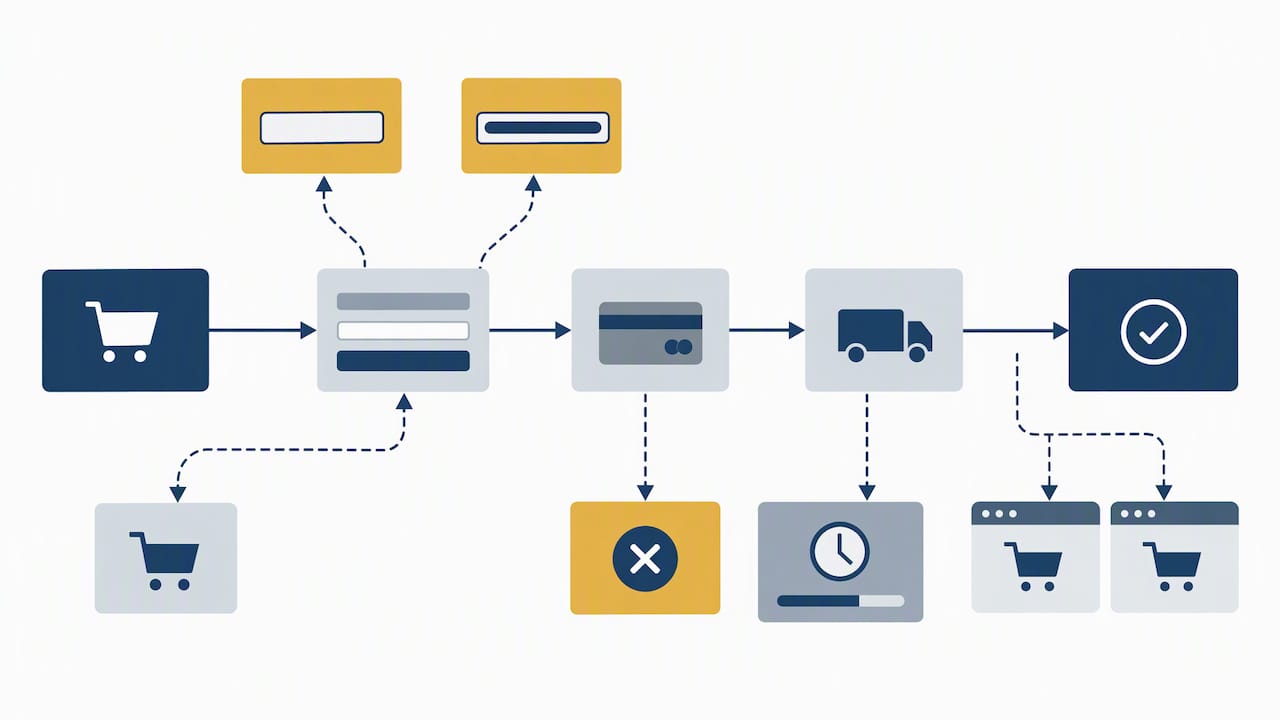
The happy path is what the team already expects to work. Try an empty field, a very long entry, a back-button press mid-checkout, an expired session, a slow connection, two tabs open at once.
Finding functional gaps
Look for what the product should do and does not: a missing confirmation, an error with no recovery, a state that cannot be undone.
Personas and tours
Test as a specific person, such as a hurried new user or an administrator with too many permissions. A charter built on a persona might read: explore the login page using Chrome and different screen sizes to discover usability problems.
Exploratory testing examples
A concrete case from a medical application: the tester follows a physician’s workflow, tracking a patient’s health, comparing lab results and editing a medication dose. Because the tester is working as the physician would, questions arise that a feature-by-feature script would never ask. What happens if the dose is edited while the lab results are still loading? Does the change appear in the history?
Here is a worked example for a subscription billing screen, showing how a session unfolds:
- Charter: Explore plan upgrades and downgrades with a test card and two user roles to discover billing errors and confusing messaging.
- Minute 10: Upgrade works. The tester notes the proration line on the invoice looks odd and flags it as a question.
- Minute 25: Downgrade immediately after upgrade. The old plan name still appears in the header until a refresh. Logged as a bug with a screenshot.
- Minute 40: Tries the upgrade as a non-owner role. The button is visible but the error is a raw server message. Logged.
- Minute 60: Debrief. Two bugs, one question for the product owner, and a suggestion to add an automated check on plan state after a downgrade.
None of those findings came from a pre-written case. Each came from noticing something and following it.
Who should do the testing
Because the quality of the result depends on what the tester notices, exploratory testing rewards experience, domain knowledge and curiosity. Developers who built the feature tend to test the way they built it. A fresh pair of eyes, whether a dedicated QA engineer or real end users, tends to find different problems. For a primer on the role itself, see our overview of manual QA testing basics.
Where the line falls between QA and customer acceptance also affects who explores what. Our comparison of UAT vs QA sets out which release decisions belong to which owner.
If you outsource part of this work, manage it by outcomes and session reports, not by watching hours. Our guide to managing offshore developers without micromanaging applies directly to remote testers too.
Our perspective
We place senior engineers with growth-stage teams, and we sell human QA, so we see the same pattern repeatedly. A team has a green automated suite, ships on a Friday, and hears about the real problems from customers on Monday. The suite was never wrong. It simply checked what the team already knew to check.
Our view is that exploratory testing is the cheapest way to learn what you do not know before customers do. It works when three conditions hold: a clear charter, a tester with enough experience to judge what looks wrong, and a written record someone else can read. Drop any of the three and it turns into casual poking around.
We also think it should not replace automation. Let scripts hold the line on known behavior, and spend human attention on new features, risky changes and the paths real users take. That is how we structure our own release checks, and why the findings go back into regression coverage rather than staying in someone’s head.
— Editorial Team
Getting experienced testers for a release
If your team lacks the time or the senior testing skill for this, we offer it as a defined service. Our human QA services include a Human Release Check at $1,500 one-off, Release Check + Real Users from $2,500 one-off, and Ongoing Human QA from $3,500 per month. If you would rather add a permanent tester or automation engineer to your team, see our QA and test automation engineers, from $48/hr.
FAQ
What is exploratory testing in simple terms?
It is testing where the tester learns the software, designs tests and runs them at the same time, with no pre-written steps. Each result guides the next test. It is structured by a charter and notes, so it is different from random clicking.
Is exploratory testing the same as ad hoc testing?
Not quite. Ad hoc testing is informal and usually undocumented. Exploratory testing has a mission, a timebox, recorded notes and a debrief, so the work can be reviewed and repeated in spirit if not in exact steps.
How long should an exploratory testing session be?
The session-based method uses blocks of about 90 minutes in the author’s team. Many teams use 60 to 90 minutes. Pick a length that allows uninterrupted focus and one clear charter.
Can exploratory testing be automated?
The execution of checks can be automated, but the judgment behind exploration cannot, as James Bach notes. What you can automate is the regression check created after a session finds a bug.
When should we not use exploratory testing?
Avoid relying on it alone when you need documented, repeatable proof that specific requirements pass, or when the product is too incomplete for meaningful use. In those cases, scripted checks come first and exploration follows once the system is usable.
Sources
- Exploratory Testing in an Agile Context (Agile Alliance)
- Exploratory testing, Service Manual (GOV.UK)
- 10 exploratory testing techniques for QA professionals (TechTarget)
- Session-Based Test Management (Satisfice)
- How to Write Exploratory Test Charters (Xray Blog)
- Writing Exploratory Charters (Testing Guide)
- Exploratory Testing (James Bach)
- Exploratory testing (Wikipedia)
Recommended
- How to Write Acceptance Criteria That Teams Can Test
- Software Release Checklist: 5 Gates, Rollback, and Human Checks
- Fix Flaky Tests Before Blind Retries Hide the Root Cause
- Earn the U.S. Median $99,620: Manual QA Testing for Beginners (ISTQB Basics)
This article may have used AI tools in the writing process. Facts, figures, and recommendations can be wrong or out of date. Do not treat this as professional advice.